The AI employee platform
Built inside your existing ChatGPT, Claude and Grok subscription. Hire AI employees with real jobs. They answer leads, write, follow up and browse, remember your business, and ask before anything goes out.
Free on your own computer. No per-message fees, ever.
- Works with
- ChatGPT
- Claude
- Grok
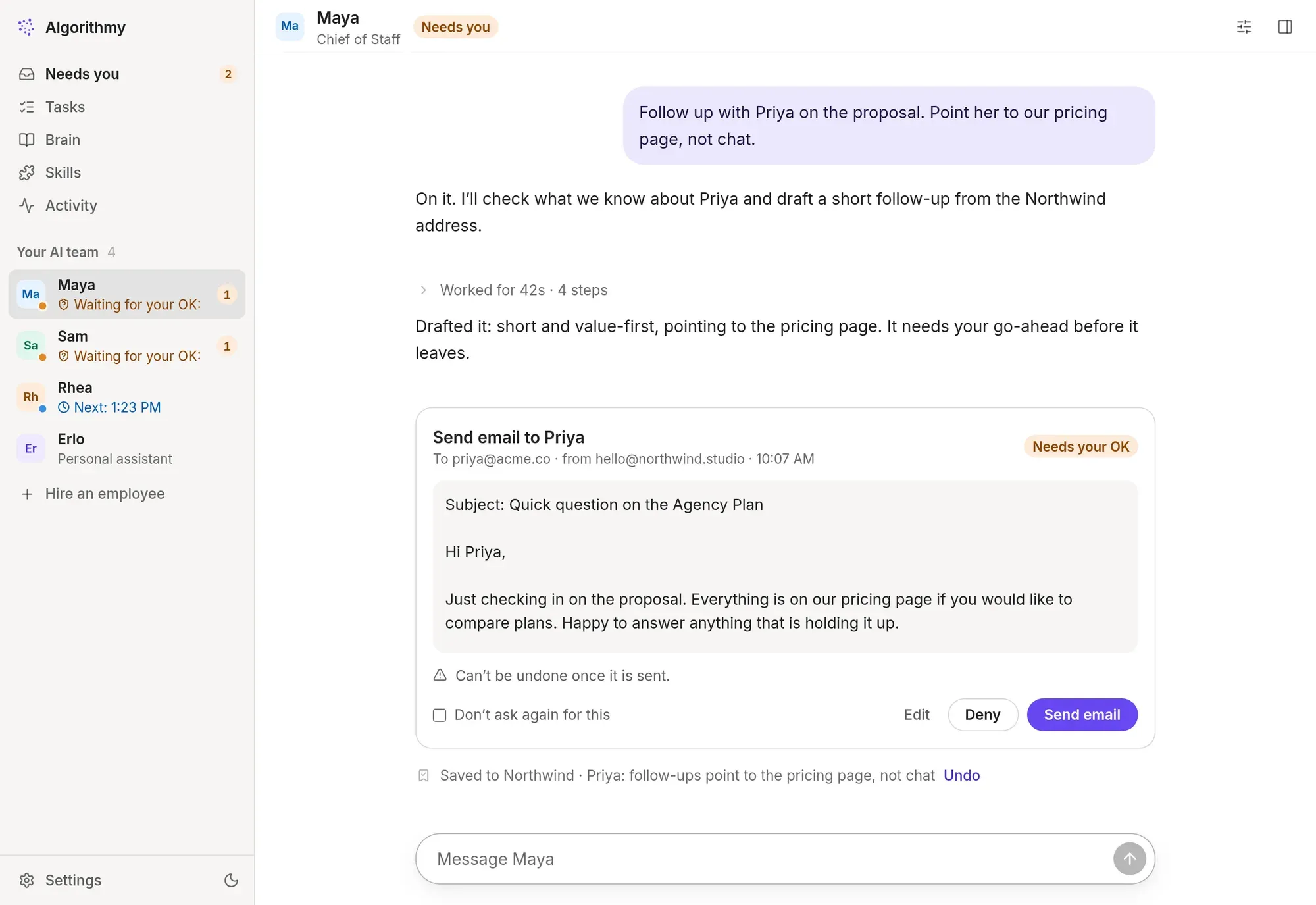
Most AI tools answer questions. Tenbrain gives you a team that does the work, remembers how you like things done, and asks before anything goes out.
Your first AI employee in minutes
No prompts to engineer, no workflows to draw, no terminal. Install the app, connect your AI plan, pick a team.
Connect the plan you pay for
Sign in to ChatGPT, Claude or Grok on their own sign-in page, once. Every employee shares that sign-in. Tenbrain never sees your password.
Pick your AI team
Choose ready-made roles, or start from a template for an agency, online store, consultancy, SaaS or real estate business. Each arrives with a job description, rules and tools.
Approve from anywhere
Your team works, files what it learns and brings you only what needs a yes. Approve, edit or deny from your desktop or your phone.
One team. Every AI you already pay for
Most AI employee tools sell credits on top of the subscription you already have. Tenbrain runs your employees inside that subscription, so a busy month doesn’t mean a bigger bill from us.
The default for writing in your voice, research with sources and work in the browser.
Claude Pro or Max
Picked for code, spreadsheets and numbers. Runs on your computer today; cloud teams next.
ChatGPT Plus, Pro or Business
A third engine for your team, under your own Grok plan. Pin an employee to Grok or let Tenbrain choose.
SuperGrok
Connect one plan or several. Tenbrain picks the right one for each job, moves to the other when a plan hits its limit, and tags every reply with the AI that wrote it. Pin an employee to one AI whenever you like.
Hire roles, not prompts
Each AI employee has a job description, rules you set, the tools it may use and its own memory of your clients and decisions. They ask each other for help, and hand work on when it belongs to someone else.
AI Chief of Staff
Writes your morning briefing, watches the inbox, chases open items and routes work to the rest of the team.
Briefing · inbox triage · follow-ups
AI Sales Assistant
Answers new leads with the right plan and price, books calls and nudges deals that have gone quiet.
Lead replies · follow-ups · CRM notes
AI Researcher
Runs competitor scans, finds prospects and answers questions with sources, then files what it found.
Competitor scans · lead research · reports
AI SEO Writer
Turns briefs into articles in your voice, following your SEO rules and the skills you teach it.
SEO briefs · blog posts · page copy
AI Designer
Drafts social posts, ad variations and simple visuals from your brand guidelines.
Social posts · ad copy · brand checks
AI Personal Assistant
Private by default. Keeps your calendar and errands, and shares only what you allow, like your availability.
Calendar · reminders · errands
Less managing, more deciding
You stay the boss. The team does the legwork, keeps each other informed and brings you the decisions. Here is an ordinary Tuesday.
Maya, your Chief of Staff, sends the morning briefing: three replies to make, one invoice overdue, a call at two.
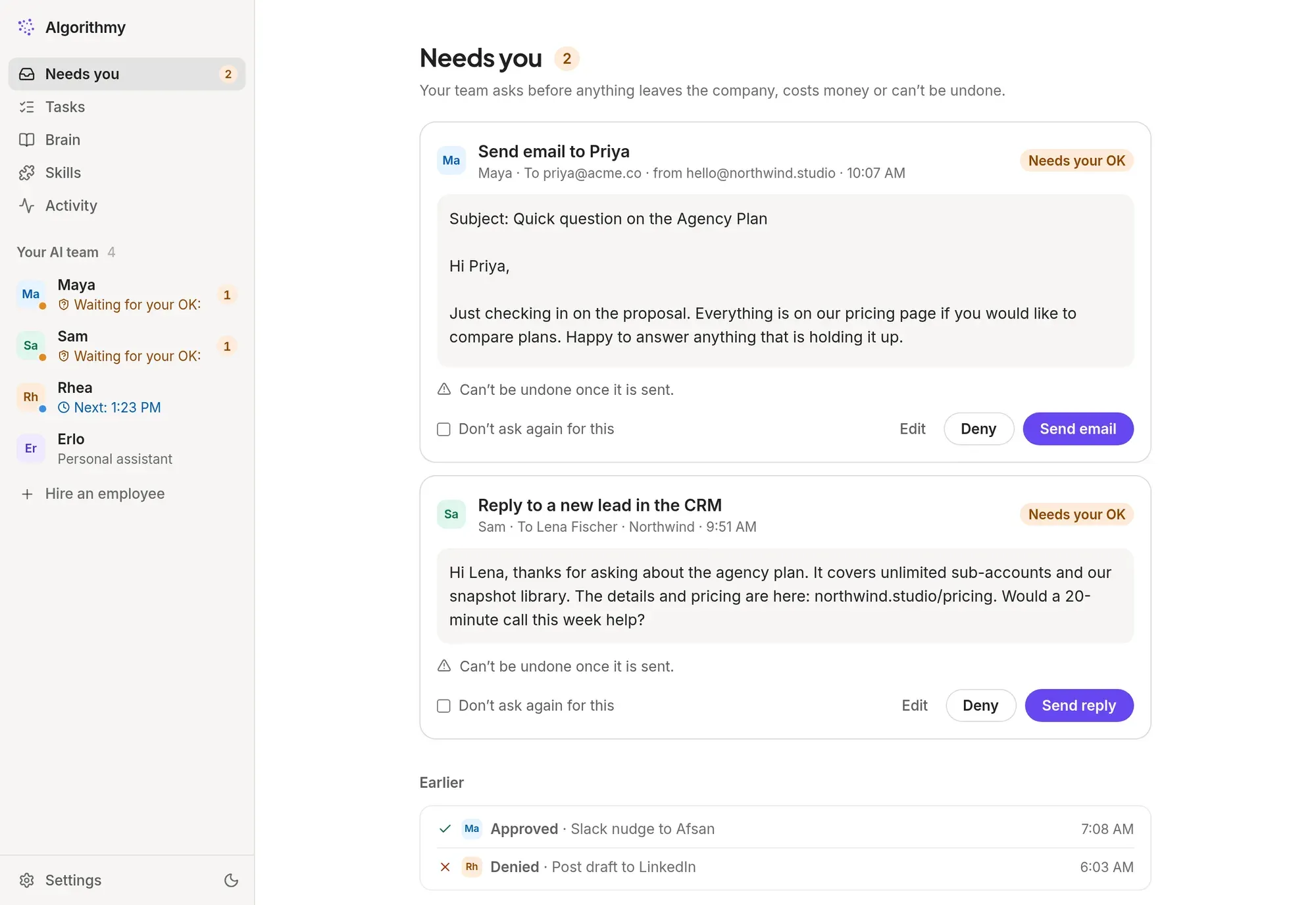
Sam answers a new lead with the right plan and a link to pricing.Waits for your OK
You approve it from your phone, between meetings. Maya’s follow-up to a client goes out too.
A site needs your login. You take over the team’s browser for a moment, sign in, and hand it back.
Rhea finishes the competitor scan she runs every week, with sources, and files it.
Everything decided today is in the Brain, so tomorrow nobody asks you twice.
It remembers, so you don’t repeat yourself
Clients, decisions, prices, how you like things done. Your AI employees save what matters as they work and look it up before they act. Your standing rules are in front of every employee, every time.
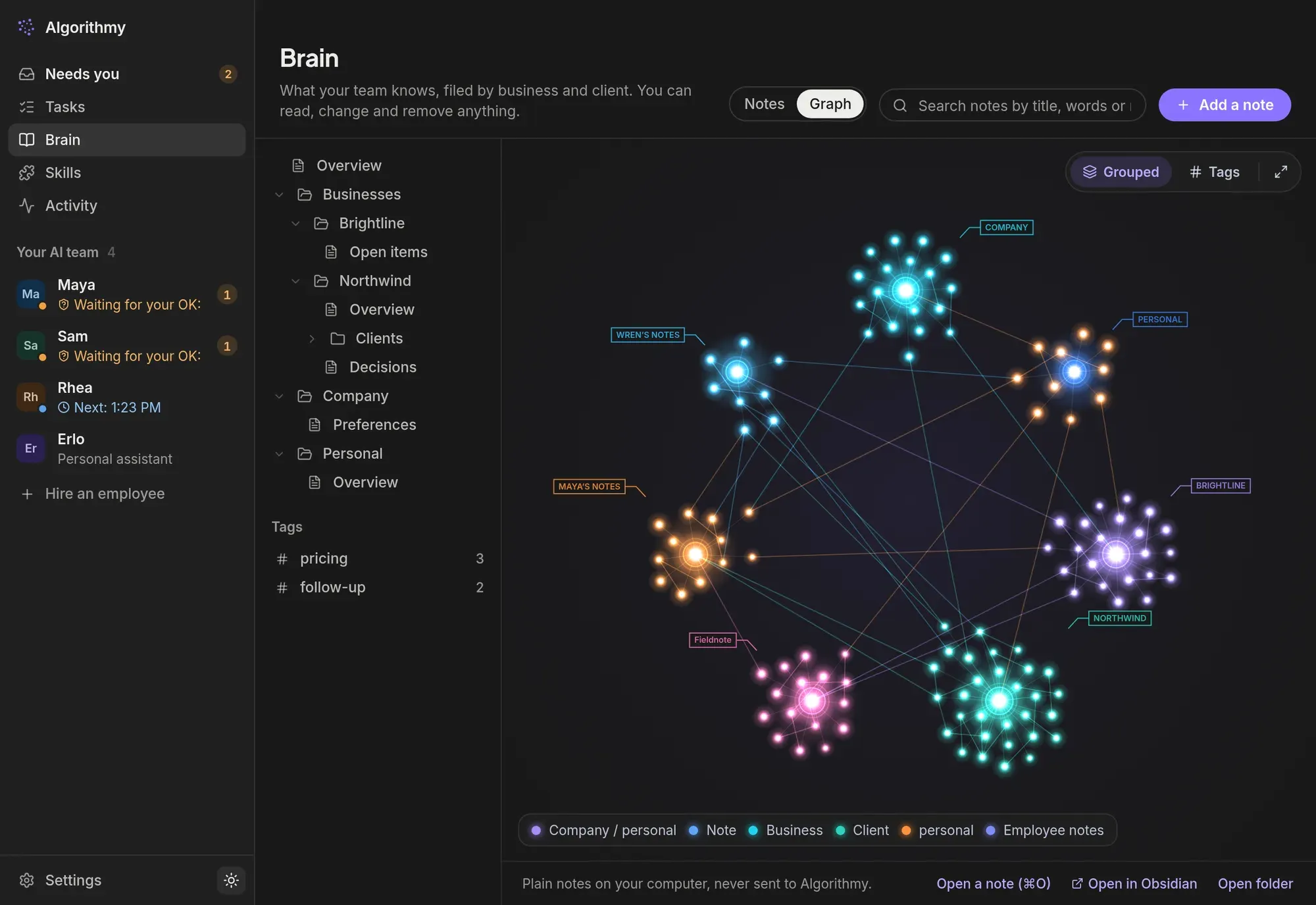
Filed as they go
“Priya prefers a call before a proposal” is saved under Priya the moment it comes up, and found again even when you word it differently.
Shared by the team
Sam knows what Maya promised. Your personal assistant’s notes stay private unless you say otherwise.
Yours to keep
Plain notes in a folder. Read them, edit them, export them, or open them in Obsidian.
You stay the one who says yes
Your AI employees ask before anything leaves the company, costs money or can’t be undone. See exactly what will happen, edit it, and approve on your computer or phone.
- Write rules in plain English: “Send client emails only when I say send”
- Set each website to read-only, ask first, or trusted
- Take over the team’s browser to sign in yourself; passwords never reach the chat
- Every action is in the activity log
Teach it once, the way you do it
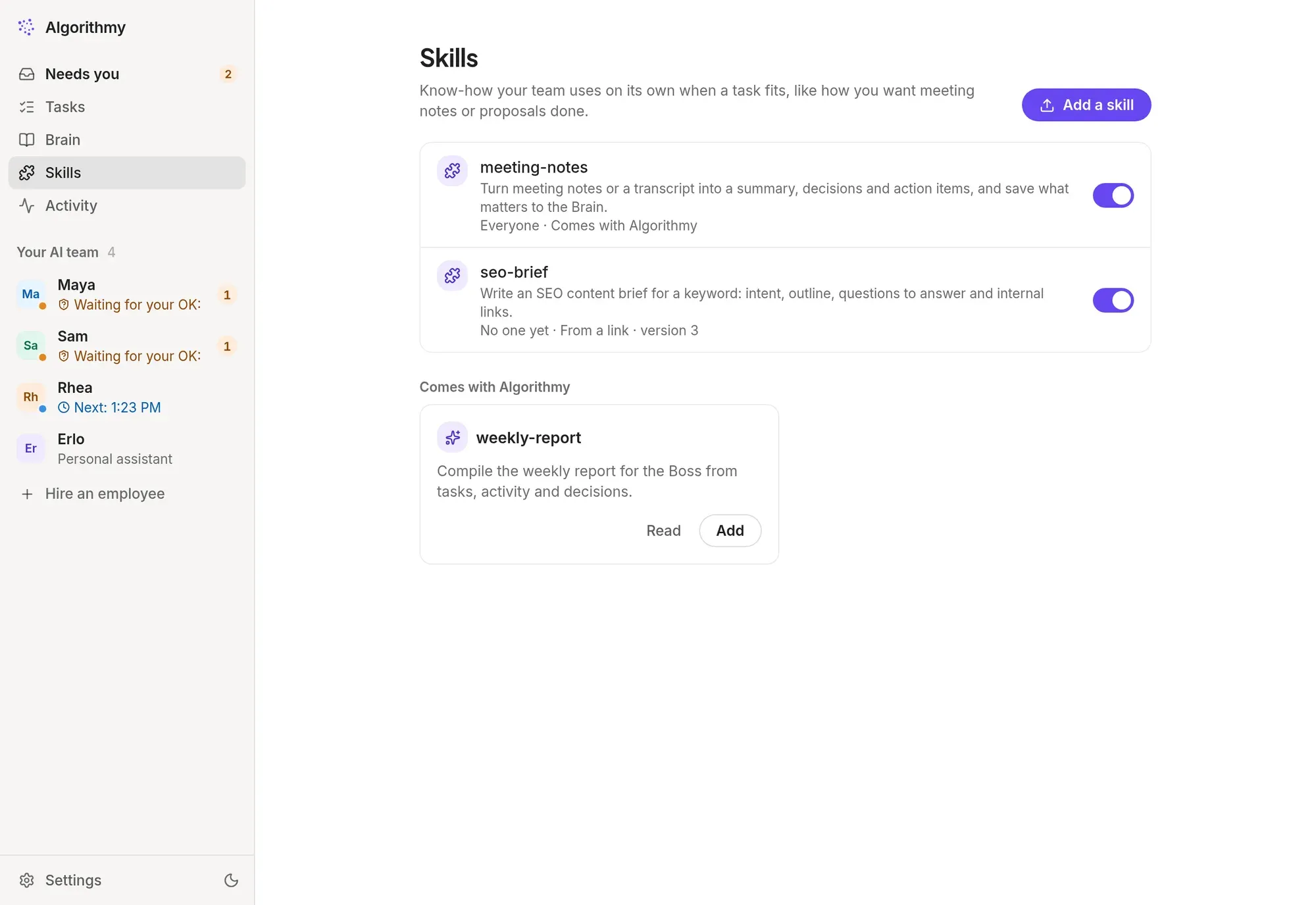
Skills are short instructions your team follows whenever a task fits: how you write meeting notes, proposals or a weekly report. Six come built in; add your own, or install one from a link.
- Built in: meeting notes, email writer, weekly report, SEO brief, lead research, proposal writer
- Give a skill to everyone, or to one employee
- Earlier versions are kept, so you can go back
- Uses the open skill format, so existing skills just work
Work that happens without you asking
Give any employee a job: when it runs, what it does and how many times a day it may run. Schedules survive restarts, and missed runs are reported, never silently lost.
AI employees for small businesses
Built for founders and small teams who already pay for an AI plan and want it to do the work, not just answer questions.
Founders and operators
A Chief of Staff who reads the inbox before you do, and a team that follows up while you’re in meetings.
Agencies
Lead replies, client follow-ups, SEO briefs and weekly reports, with each client’s preferences remembered.
Online stores
Customer replies drafted for approval, competitor price checks and product copy in your brand voice.
Consultants
Prospect research, proposals in your format and meeting notes that land in the right client’s folder.
SaaS teams
Trial follow-ups, competitor scans and release notes, with numbers work handed to ChatGPT automatically.
Real estate
Instant replies to new enquiries, viewing reminders and listing descriptions, all checked by you first.
How Tenbrain is different
Looking at Lindy, Viktor, Squad, Grok Bot, Muse, OpenClaw or Hermes? Here is how Tenbrain compares with the two usual kinds of AI employee tool.
| Tenbrain | Hosted AI employee appsCloud-only, sold with credits | Open-source agentsSelf-hosted | |
|---|---|---|---|
| AI usage | Your own ChatGPT, Claude or Grok plan. No credits | Usually credits or usage tiers on top | Your own API key or plan |
| Where it runs | Free on your computer, or your own private cloud server | The vendor’s cloud | Wherever you set it up |
| Memory | Plain notes you can read, edit and open in Obsidian | Inside the vendor’s app | Files, after some setup |
| Approvals | Built in for anything that sends, posts or pays | Varies by product | Up to you to configure |
| Ready-made roles | Chief of Staff, Sales, Research and more | Templates or build your own | Build your own |
| Setup | Install, sign in, pick a team. No terminal | Sign up | Terminal and config files |
General comparison as of October 2026. Individual products differ; check each vendor’s site for current details.
Your computer, or your own server
You choose when you first open the app, and you can move later, with your employees, chats, jobs and Brain. Either way the team is yours alone.
| On your computerFree | In the cloudPro | |
|---|---|---|
| Works | While your computer is on | Around the clock, even with your laptop closed |
| Your data | Stays on your computer | On a private server made for you alone |
| Phone app | No | Yes: chat, approvals and notifications |
| Setup | Install and go | Sign in. We set up the server for you, usually in under a minute |
Your plan, your data, your rules
An AI employee works with your email and your accounts, so trust is the product. Here is what we built in.
We never see your AI sign-in
You sign in on OpenAI’s, Anthropic’s or xAI’s own page. Your credentials stay on your machine or your private server.
Each employee in its own space
Every employee has its own folder, its own permissions and its own browser profile. Your personal browser is never used.
Instructions come only from you
Text in emails, web pages and chats is treated as information, never as orders, so a stranger’s email can’t redirect your team.
Start free. Move to the cloud when it helps
Both plans run on your own AI subscription, so the AI itself is covered by what you already pay OpenAI, Anthropic or xAI. We never charge per message or per task.
Free
Everything your AI team needs, on your own machine.
- Up to 4 AI employees on your own computer
- Brain, skills, jobs and approvals
- Phone app, through your computer
Local Standard
No limit on the size of your team, still on your own machine.
- Everything in Free
- As many AI employees as you like
- Dashboards and voice
Cloud Premium
Your own server, working while you sleep, with the phone app.
- Everything in Local Standard
- Your own cloud office: your team works with your computer off
- Phone and computer reach it from anywhere
Cloud Max
Your own server, with room for heavy use.
- Everything in Cloud Premium
- More office hours and storage, for heavy use
- For a Claude or ChatGPT plan of $100 and up
Early access: no payment is taken. Cloud plans need an invite code, entered in the app.
Get Tenbrain
Install it, open it, choose where your team works. During early access the desktop app is for Linux; macOS and Windows are on the way.
Claude Pro or Max, ChatGPT Plus, Pro or Business, or SuperGrok. You sign in once, in the app.
Ubuntu 22.04 or newer, Debian 12, or similar, 64-bit, with 8 GB of memory or more, and Google Chrome for your team’s browser.
Android 8 or newer, and a cloud team (Pro). iPhone comes later.
sudo apt install ./TenBrain-0.6.2.deb (a note about _apt and “unsandboxed” is harmless) · version 0.6.2 · 133 MBDownload Linux: AppImageFor other distributions. Make it executable. On Ubuntu 24.04 install libfuse2t64 first and start it with --no-sandbox; the .deb needs neither · version 0.6.2 · 169 MBDownload Phone: Android app (test build)For cloud teams. Allow your browser to install apps when Android asks · version 1.0.30 · 133 MBDownload Questions about AI employees
What is an AI employee?
An AI employee is an AI worker with a job: a role, rules you set, the tools it may use and its own memory of your business. Unlike a chatbot, it does the work itself, such as answering leads, writing reports or researching competitors, and asks you before anything leaves the company.
Which AI subscriptions does Tenbrain work with?
Claude Pro and Max, ChatGPT Plus, Pro and Business, and SuperGrok. Connect one or several, and Tenbrain picks the right one for each job and shows which answered.
Do I pay Tenbrain for AI usage?
No. Your employees think with the AI plan you already pay for. Tenbrain never charges per message or per task, and never resells AI usage. Heavy days can reach your plan’s limits sooner; the app shows where you stand and can switch to your other plan.
What if an AI employee gets something wrong?
Anything that sends, posts, pays or can’t be undone waits for your approval, and you can edit it first. You set rules per employee and per website, and every action is in the activity log.
Can Tenbrain see my data?
On your computer, your team, its chats and the Brain stay on your machine. In the cloud, they live on a private server made for you alone. Tenbrain never sees your AI sign-in.
Which computers and phones does it run on?
During early access the desktop app runs on Linux (Ubuntu, Debian and others) and the phone app on Android. macOS, Windows and iPhone are in preparation; write to us and we’ll tell you when they’re ready.
How is Tenbrain different from other tools?
Tenbrain runs on the AI subscription you already have instead of selling you credits, can run free on your own computer, and keeps your team’s memory as plain notes you can read, edit and open in Obsidian. Approval before anything goes out is built in.
How do I get Pro?
During early access, cloud teams are by invitation. Ask us for an invite code; you enter it in the app when you choose “In the cloud”. You can move your team from your computer to the cloud later, with everything it knows.
Hire your first AI employee today
Free on your computer, running on the AI plan you already pay for.