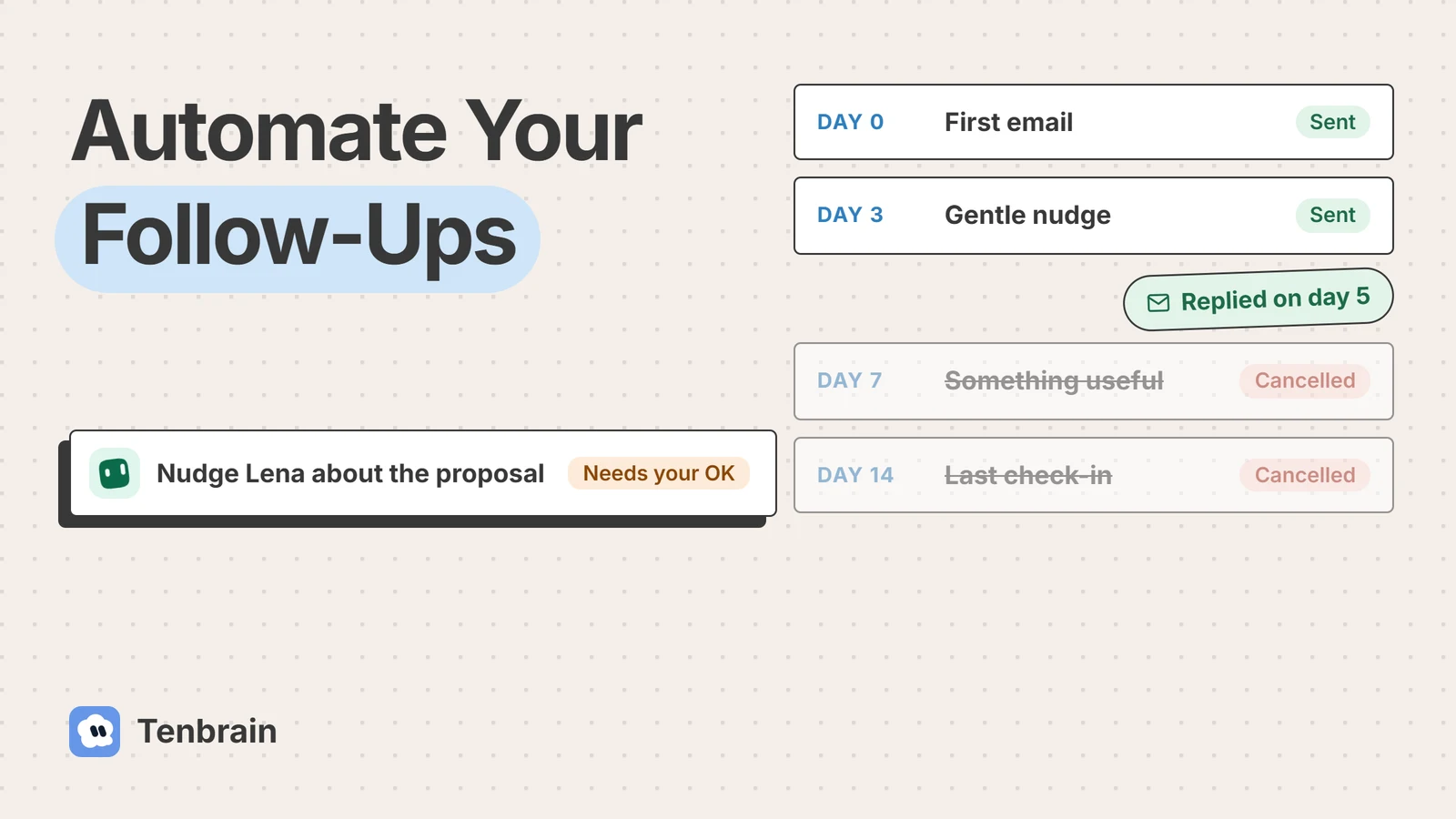
Learning how to automate follow-up emails comes down to one rule: the follow-up goes out on time, and it stops the moment someone replies. Get that right and automation feels like good manners. Get it wrong and it feels like spam.
Most deals, quotes and favours need more than one message, and most people mean to follow up and then don’t. This guide shows you how to fix that in Gmail, in Outlook, in your sales software and with AI, with templates you can copy and the mistakes to avoid. We make one of the tools mentioned here, and we say so where it comes up.
Key takeaways
- An automated follow-up sends on a schedule and stops when the person replies.
- Gmail and Outlook remind you; sending only if there’s no reply needs a sequence tool, a flow or an assistant.
- Keep each follow-up short, useful and in the original thread.
- Reply-rate studies come from vendors and disagree, so test on your own list.
What Is an Automated Follow-Up Email?
An automated follow-up email is a message that goes out on its own after a set time, because the person you wrote to hasn’t answered or because something happened, like a purchase or a missed meeting. Email follow-up done this way saves you from remembering who you were waiting on. The good versions also stop by themselves when the person replies, so nobody gets a nudge after they have already said yes.
When Follow-Up Sequences Get Sent, and When They Stop
Most of them look like this: an email sequence with a first message, a short nudge a few days later, something useful a week in, and a polite last check-in. A reply at any point cancels whatever is left.
- Day 0First emailYour proposal goes outCancelled
- Day 3Gentle nudgeOne line, easy to answerCancelled
- Day 7Something usefulA case study or an answerCancelled
- Day 14Last check-inA polite closeCancelled
They reply on day 5: the rest is cancelled
What the Numbers Say About Following Up
The studies on follow-ups come from email software companies, mostly about cold outreach, so treat them as a guide rather than a law. They agree that follow-ups earn replies, and disagree on how much.
Following Up, by the Numbers
Replies fall with each step
- 1.0%Email 1
- 0.9%Email 2
- 0.5%Email 4
- 0.3%Email 5–6
Median reply rate by step, outreach emails. Woodpecker, last 90 days of 2025, about 3 million first emails. Source
+65.8%
more replies from sending just one extra follow-up, in an older study of 12 million outreach emails.
Backlinko with Pitchbox, data from 2019. Source
How many steps to send
- Belkins3 to 5 steps
- Instantly4 to 7 touches, 3 to 4 days apart
Each vendor’s recommendation from its own data.
The best automated sequences follow the pattern that holds across all of them: replies fall with each step, so a short sequence of three to five messages does most of the work, and anything after that should earn its place.
Three Ways to Follow Up: By Hand, Sequence or AI
There are three ways to get a follow-up out of the door. Here is how each one handles the same quiet prospect.
A prospect went quiet after your proposal.
- You notice the silence, if you notice
- You write a nudge between meetings
- You log it, if there’s time
Depends on your week
- Sends the day 3 message on time
- Stops when they reply
- Same words for everyone
Reliable, a bit generic
- Reads the thread and the proposal
- Drafts a nudge about their question
- Waits for your OK, then logs it
Timely and personal
A sequence is the classic answer and works well for anything repeatable. AI drafting is newer: it reads the thread and writes something specific, which matters most for sales conversations and client work, where a generic nudge can cost you the deal.
Setting Up Automatic Follow-Ups, Step by Step
Whichever tool you use, the setup is the same seven decisions. Make them before you open any software, and before sending follow-up emails to anyone real.
1. Pick the Trigger
Decide what starts the clock: no reply after a set number of days, a form filled in, an order placed, a meeting missed or a proposal opened. One trigger per sequence keeps it simple.
2. Write a Follow-Up Email for Each Step
Write every step before you switch anything on. Each message should add something new, so step two isn’t just “bumping this up”. Three to five steps is plenty for most jobs.
3. Set the Stop Rules
This is the step people skip. The sequence must stop when the person replies, books a call, buys or unsubscribes. Check where your tool looks for replies: some only see the original thread.
4. Personalize What Matters
Personalization means more than a first name. Mention their company, what they asked about or the specific pain point they raised. A personalized follow-up, based on recipient behavior like a reply to an earlier step, is the difference between a reminder and spam.
5. Choose the Tool
Gmail and Outlook can remind you and schedule messages. A sequence tool sends automatically and stops on reply. AI drafts the message itself. The sections below cover each one.
6. Test It on Yourself
Run the sequence on your own address and a colleague’s. Reply to one, ignore the other, and check that only the right one keeps going.
7. Watch the First Week
Read every message that goes out in the first week. Small errors, like a wrong name field or a broken link, are easy to fix early and embarrassing later.
Automatic Follow-Ups in Gmail
Gmail can remind you to follow up and send a message later, but there is no auto follow-up: Google’s help pages don’t offer a built-in way to send a follow-up email only when there’s no reply. Here is what it does have.
Turn On Nudges
Nudges put sent messages you may need to follow up on at the top of your inbox. Turn them on in Settings, See all settings, General, under Nudges, then save. Conversation view needs to be on. Nudges remind you; they don’t send anything.
Schedule the Follow-Up Yourself
Write the follow-up now and use Schedule send, from the arrow next to Send. You can have up to 100 scheduled messages. The catch: it goes out even if they reply first, so check before the day.
Save Each Follow-Up as an Email Template
Turn on templates in Settings, Advanced, then insert them from More options when you write. They only work in Gmail on a computer.
Mail Merge for Many People
Mail merge sends one personalized message to many people, on Workspace Individual, Business Standard and Plus, and Enterprise and Education plans. It replaced multi-send.
When You Need Real Automation
To send only when there’s no reply, add a tool that does it: a Gmail add-on like Streak, a sequence tool, or a workflow built with tools like Google Apps Script, Make or n8n that checks the thread before sending. Those take some setting up.
Follow-Up Automation in Outlook With Power Automate
Outlook has the same gap as Gmail: it can schedule and remind, and sending only when someone hasn’t answered takes a flow or another tool.
Schedule Send and Follow-Up Flags
In new Outlook and on the web, choose Schedule send from the arrow next to Send. In classic Outlook, use Do not deliver before under Delivery options. To get a reminder instead, add a follow-up flag from Message, Follow Up.
A Power Automate Flow That Checks for a Reply
Microsoft doesn’t publish an official “follow up if no reply” template. Its email scenarios page covers sending email and approval reminders. The pattern people commonly build looks like this:
- TriggerWhen a new email arrives (V3)Watching your Sent Items folder
- ActionDelay3 days
- ActionGet emails (V3)From that person, since you sent it
- ConditionAny reply?Yes: stop here. No: carry on.
- ActionSend an email (V2)Your follow-up, in the same thread
Before You Build It
- Microsoft 365 licences can run cloud flows with standard connectors, which covers Outlook. Premium connectors are not included, and there is a daily action limit.
- The reply check is the fragile part. Match on the person and the subject, and allow for replies that change the subject line.
- Send the follow-up as a reply in the original thread, so the person sees the context.
See Microsoft’s licensing page for what your plan includes.
Follow-Ups Inside Your Sales Software
If your contacts live in a CRM, its own sequences are usually the cleanest option, because they know who replied, who booked and who bought.
HubSpot Sequences
Sequences come with Sales Hub or Service Hub on Professional or Enterprise, with a Sales or Service seat. Contacts are unenrolled automatically when they reply to any email in the sequence. Each sequence can hold up to 10 email templates, and it sends at most three sequence messages a minute, with a daily limit per user. Choosing the right sending window matters less than getting the stop rule right.
Other Sales Tools
Most sales CRMs offer something similar, under names like cadences or campaigns. Check three things: that replies stop the sequence, that it sends from your own mailbox, and that every message is logged against the contact.
The Best Follow-Up Email Software in 2026
Popular email automation tools include sequence apps, sales platforms and AI drafting. Most lists of top follow-up software are written by the companies on them. We make Tenbrain, so weigh our entry accordingly. We checked each tool’s own pages on November 10, 2026 for one thing above all: does it stop when someone replies? Check the integration with your own mailbox in a trial too.
| Tool | Best for | How you pay |
|---|---|---|
 Tenbrain | AI that drafts each follow-up | A flat $29 or $69 a month, plus your AI plan |
 HubSpot Sequences | Teams on its paid sales plans | Sales or Service Hub, Pro or Enterprise seat |
 Instantly | Cold outreach at volume | Flat monthly plans by volume |
 lemlist | Personalized outbound | Per user |
 Mailshake | Simple outreach campaigns | Per user |
 Mixmax | Sales teams in Gmail | Per user, billed yearly |
 Streak | A CRM inside Gmail | Per user |
 Yesware | Tracking and campaigns | Per seat |
 Gmail | Reminders and scheduling | Included with Gmail |
 Outlook + Power Automate | Microsoft 365 users who will build a flow | Standard connectors with Microsoft 365 |
Tenbrain
AI-powered employees, a sales assistant and a chief of staff, that chase unanswered emails for you. Tenbrain comes with a follow-up-chaser skill for chasing replies with timing rules and an easy re-ask, and it drafts each message from the thread, so no two follow-ups read the same.
- Good for
- Owners and small teams who want personal follow-ups without writing them.
- Watch out for
- It needs a Claude or ChatGPT plan, and it’s built for your own conversations, not bulk outreach.
HubSpot Sequences
The obvious pick if you already sell from it: replies unenroll contacts automatically, and everything is logged.
- Good for
- Teams on its paid sales or service plans.
- Watch out for
- It needs a Professional or Enterprise seat, and a sequence holds 10 email templates at most.
Instantly
Outreach software built for scale. It stops follow-ups when a lead replies by default.
- Good for
- Outbound teams sending to large lists.
- Watch out for
- Built for outbound, so it’s more than most owners need for warm follow-ups.
lemlist
lemlist calls itself an all-in-one platform for outbound, and prices by the number of users.
- Good for
- Sales teams who want each message to feel hand-made.
- Watch out for
- Check its reply settings during your trial.
Mailshake
Simple outreach campaigns. Mailshake stops reply-based follow-ups once someone’s reply marks them as a lead.
- Good for
- Small teams who want a straightforward campaign tool.
- Watch out for
- Drip messages work differently from reply-based ones, so check which you set up.
Mixmax
Sequences and tracking inside Gmail. Recipients leave a sequence automatically when they respond.
- Good for
- Sales teams who live in Gmail and want it to do more.
- Watch out for
- Priced per user and billed yearly.
Streak
Streak manages sales and customer relationships inside Gmail. Replies pause its follow-ups by default.
- Good for
- Owners who want a light sales tracker in Gmail.
- Watch out for
- Gmail only.
Yesware
Email tracking and campaigns from your inbox. Its campaigns remove recipients who reply or book a meeting automatically.
- Good for
- Salespeople who want to see who opened what.
- Watch out for
- Open counts are less reliable now that some mail apps load images privately.
Sales Follow-Up Emails Using an AI Assistant
Sales follow-ups are where generic sequences hurt most. A buyer who asked about pricing for twelve seats doesn’t want “just checking in”. AI reads the thread and drafts the nudge that answers what they actually asked.
Follow-up job · every weekday 9:00
Lena at Rankflo AI hasn’t replied to the proposal in four days. I drafted a short nudge that answers her question about seats, using your follow-up rules.
A Sales Follow-Up Email After a Call
Send a recap the same day: what you heard, the agreed next steps and what moves things toward the next step. An assistant can draft it from your notes while you are still on your next call.
When a Lead Goes Quiet
Space the nudges three or four days apart, and make each one easier to answer than the last. Relevant follow-ups that touch on their pain points get read; reminders don’t. End the sequence with a polite close rather than a guilt trip.
When Someone Misses the Call
Send an email within the hour with two new times or a booking link. A no-show is usually busy, not uninterested, so send an email immediately rather than waiting a day.
Customer, NPS and Post-Purchase Follow-Ups
Not every follow-up is about a sale. These three are triggered by something the customer did, which makes them the easiest to put on autopilot.
Customer Follow-Ups After Support
A day or two after a ticket closes, check that the fix worked. Trigger it from your help desk when a ticket is solved, and send it from a person’s address so a reply reaches a human.
NPS Follow-Ups
When someone answers your NPS survey, follow up based on the score. Thank promoters and ask for a review; ask detractors what went wrong and offer a call. Most survey tools can send follow-ups based on the score.
Post-Purchase Follow-Ups
After an order, send a message that helps them use what they bought, then a check-in later. If something went wrong, a real follow-up from a person will solve more than a coupon.
Product Updates, News and Announcements
These are email marketing, not follow-ups. Keep them on a separate list with their own opt-out, so a customer who asks to stop hearing about launches still gets answers about their order.
Follow-Up Email Templates You Can Copy
These follow-up email examples are short on purpose, so you can learn how to write your own from them. Swap the brackets for real details and send each one in the original thread.
After a Proposal
after-a-proposal.txt
Subject: Re: Proposal for [Company]

Hi [Name],

A quick follow-up on the proposal. You asked about [their question], so I added the answer below.

[One or two lines that answer it]

Would [day] or [day] work for a 15-minute call to settle the rest?

[Your name]
When There’s No Reply
no-reply.txt
Subject: Re: [Original subject]

Hi [Name],

I know things get busy. Is [the thing] still on your list this month, or should I check back later?

Either answer helps.

[Your name]
After a Meeting
after-a-meeting.txt
Subject: Notes from today

Hi [Name],

Thanks for your time today. What I heard:
- [Their goal]
- [Their main concern]

Agreed next step: [step], by [date].

Anything I missed?

[Your name]
When They Miss the Meeting
missed-meeting.txt
Subject: Sorry we missed each other

Hi [Name],

Looks like today didn’t work out. No problem. Here is my calendar if another time suits: [booking link]

[Your name]
After a Purchase
post-purchase.txt
Subject: Getting the most from [product]

Hi [Name],

Thanks for your order. Most customers find [one tip] makes the biggest difference in the first week.

If anything isn’t right, just reply to this email.

[Your name]
The Last Check-In
last-check-in.txt
Subject: Closing the loop

Hi [Name],

I haven’t heard back, so I’ll assume the timing isn’t right and stop following up. If that changes, just reply and we’ll pick it up from here.

[Your name]
How Long to Wait and How Many Follow-Ups to Send
The vendor studies above point the same way: most replies come early, and each extra step earns less. Send personalized follow-ups at these intervals to start with:
| Situation | First follow-up | How many in total |
|---|---|---|
| A warm lead or a proposal | After 2 to 3 working days | 3 to 4 |
| Cold outreach | After 3 to 4 days | 4 to 6, spaced out |
| After a meeting | The same day | 1, then as agreed |
| After a missed meeting | Within the hour | 1 or 2 |
| After a purchase | 1 to 3 days | 2, then marketing emails |
These are starting points, not rules. Your own reply data, after a few weeks, beats any benchmark.
Best Practices for Effective Follow-Up Emails
Reply in the Original Thread
Send each follow-up as a reply to the original email, from a real sender, to keep the conversation in one place. Better emails come from treating every nudge as a custom email to one person.
Write a Subject Line That Says Why
Keep the original subject, or make it specific: “Re: pricing for 12 seats” beats “Following up”.
Keep It Short
Keep the email body to two to four sentences. If it needs scrolling on a phone, it’s too long for a follow-up.
Add a Helpful Resource Each Time
A useful link, an answer to their question or a relevant example. Each follow-up should give them a reason to reply that the last one didn’t.
End With One Clear Next Step
One question, one link or one time slot. Make the next step obvious and small.
Common Mistakes When Automating Follow-Up Emails
No Stop Rule
The worst automated email is the one that nudges someone who already replied, or already bought. Test your stop rules before anything else.
Same Message for Everyone
A template with only a first name swapped in reads as automated. Add at least one detail that shows you know who they are.
Following Up Too Often
Daily nudges train people to ignore you. Give each one a few days to land.
Trusting Email Opens
Some mail apps load images privately, which makes open counts unreliable. Judge your sequences by replies and booked calls.
Sending Without Reading
Automation multiplies mistakes. A wrong name field or a broken link goes to everyone at once, so read the first batch.
Keep Your Follow-Ups Within the Rules
Commercial follow-ups are still commercial email. In the US, the FTC’s CAN-SPAM guide says you must honor an opt-out within 10 business days, makes no exception for business-to-business email, and puts penalties at up to $53,088 for each email in violation. In the EU and UK, GDPR and the local email rules apply too. Say who you are, keep subject lines honest and make opting out easy.
How to Tell Whether Your Follow-Ups Work
| Measure | What good looks like |
|---|---|
| Reply rate by step | Most replies in the first two or three steps |
| Conversion to a call or a sale | Rising, the number that matters most |
| Leads replied to within a day | Close to all of them |
| Opt-outs and complaints | Low and steady |
| Follow-ups sent to people who replied | Zero |
Look at which step earns the replies, rewrite the ones that don’t, and cut the sequence where replies stop.
Where Tenbrain Fits
Tenbrain gives you a team of AI employees, including a Sales Assistant and a Chief of Staff who chase the replies you’re owed, with or without a sales team behind you. They work in a private workspace in the cloud, so follow-ups go out on schedule when your laptop is closed, and they think with the Claude or ChatGPT plan you already pay for.
It suits warm follow-ups: leads, proposals, clients and invoices, where each message should sound like you. For high-volume outbound, a dedicated outreach tool is the better fit. For more on handing work to AI, read our guide to AI agents for small business.
Stop Chasing Replies Yourself
Hire an AI employee that drafts each nudge and waits for your OK, on the Claude or ChatGPT plan you already pay for.
Questions About Automating Follow-Ups
Can Gmail do automated emails?
Partly. Gmail can schedule a message for later, remind you about sent emails with no reply (Nudges), save templates and send mail merges on some Workspace plans. It doesn’t send a follow-up only when there’s no reply; for that you need an add-on, a sequence tool or a script.
Can Outlook automatically send a follow-up only if there’s no reply?
Not on its own. Outlook can schedule messages and set follow-up reminders. To send only when someone hasn’t replied, people build a Power Automate flow that waits, checks for a reply and sends if there isn’t one, or use a sequence tool.
How to automate sales follow-up emails?
Use your CRM’s sequences or a sales tool that stops when the prospect replies, with three to five short steps a few days apart. For deals where each message should be specific, AI can draft each follow-up from the thread for you to approve.
How to automate customer follow-up emails?
Trigger them from what the customer did: a solved support ticket, a delivered order or a finished onboarding. Send from a real person’s address so replies reach someone, and keep each message to one question.
How to automate NPS follow-up emails?
Set your survey tool to send a different follow-up by score. Thank promoters and ask for a review, and ask detractors what went wrong, with an offer to talk. Make sure replies go to someone who can act on them.
How to automate post-purchase follow-up emails?
Trigger a message from the order: a tip for getting started a day or two after delivery, then a check-in later. Keep marketing emails, like news, separate, with their own opt-out.
How long should you wait before sending a follow-up email?
Two to three working days for a warm lead or a proposal, three to four days for cold outreach, the same day after a meeting, and within the hour after a missed meeting.
How many follow-up emails should you send?
Usually three to five for warm conversations. Vendor studies suggest three to seven for cold outreach, and they agree that each extra step earns fewer replies.
Can AI write follow-up emails automatically?
Yes. AI tools can draft follow-ups from the thread and your notes. The safest setup has the AI draft and a person approve, at least until the drafts rarely need edits.
Is automating follow-up emails safe for client conversations?
It can be, with a stop rule for replies, a person approving anything sensitive, and nothing sent about legal, money or complaints without a human reading it first.
Sources and How We Checked
We read the Google, Microsoft and HubSpot help pages and each tool’s own pages on November 10, 2026. Reply-rate figures come from email software vendors’ own data, so we label them that way. Spot something out of date? Tell us.
- Google, Gmail Help: Nudges, Schedule send, Templates and Mail merge
- Microsoft, Schedule send and follow-up reminders in Outlook
- Microsoft, Power Automate licensing
- HubSpot, Create and edit sequences
- Woodpecker, Cold email benchmarks
- Belkins, Sales follow-up statistics
- Instantly, Cold email benchmark report 2026
- Backlinko, Email outreach study (2019)
- FTC, CAN-SPAM Act: A Compliance Guide for Business